Knowledge base
Custom objects and the shared catalogue
Make a piece of furniture from a description or a photo for 5 credits, share it with everyone, and use objects other people made.
The catalogue in Add has the usual pieces. When yours is not there (a particular armchair, a red floor lamp with a brass base, the cabinet you already own), make it as a Custom object from a few words, a photo, or both.
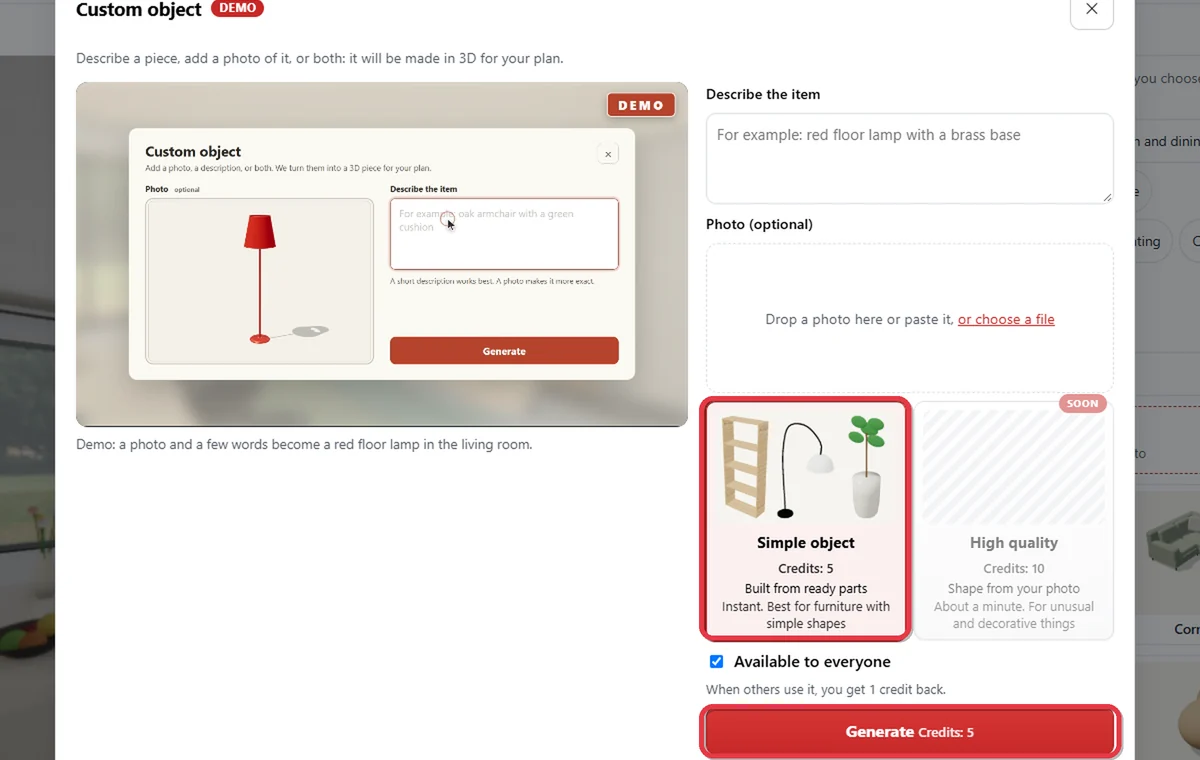
Make an object
- Open Add in the toolbar on the left and choose Custom object at the top of the catalogue.
- Describe the piece, for example "red floor lamp with a brass base", add a photo of it, or both. Drop the photo in the box, paste it or choose a file.
- Choose the kind of object. Simple object is built from ready parts, instantly, and suits furniture with simple shapes; it costs 5 credits. High quality, a shape made from your photo, is coming soon.
- Choose Generate. The object appears in the room, and from then on it moves, turns and changes size like any other piece in Edit.
Making objects needs an account with credits, on your own plan. Credits spent on an object are not returned if you do not like the result, so a clear description helps: name the kind of piece, its colours and its materials. If the photo shows something that is not a home object, the window asks for another photo or a description. A plan that is closed (the view from above only) cannot have anything added until it is opened.
On a sample design, Generate opens a short window that explains how it works and shows the prices; nothing is made there and nothing is charged.
Share it with everyone
Available to everyone is ticked when you make an object: it goes into the shared catalogue, without your name. When others use it, you get 1 credit back. To stop sharing, untick it in Edit with the object selected, or choose Stop sharing on its card.
Use objects other people made
- In Add, choose Show objects made by users.
- Sort them by Newest, Name, Rating or Most used.
- Choose one to add it to your room. The price is on its card; you pay for an object once, and your own objects are free (Yours · free).
After using an object you can give it from one to five stars. If something is wrong with it, Report it with a reason: Offensive, Copied design or Broken or spam. Objects reported by several people leave the shared catalogue.
Good to know
- Your objects travel with the design: in design options, in your account and in the share link.
- Prices and your balance are in your account; see Your own plan.
See it in 3D
Open a sample design and walk through it, check the sun, set the hour and watch the lamps come on. It is free, in your browser, with nothing to install.
Or open a sample directly: 1920s teacher's cottage · Two-bedroom apartment