Knowledge base
Comments
Pin a comment to any wall, floor or piece of furniture, reply, resolve and share a link to one comment. Free, and no account needed.
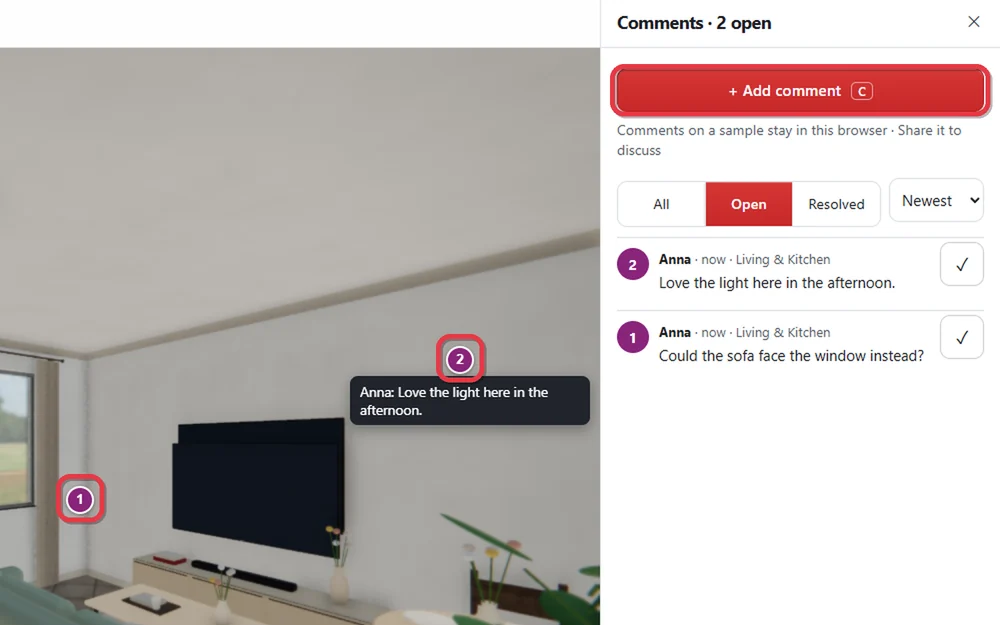
Comments in the toolbar on the left lets everyone who has the link talk about the home right where things are: "Could the sofa face the window?", pinned on the sofa. Comments cost no credits, and writing needs no account. On a link, others can write while its author has a subscription (see "Who sees comments").
Add a comment
- Open Comments and choose + Add comment, or press C on the keyboard.
- Click or tap the wall, floor or piece of furniture the comment is about. A numbered pin appears there.
- Type your name the first time (signed in, your account name is used), write the comment and choose Comment.
A comment on a piece of furniture follows the piece when it is moved.
Read, reply and resolve
- Click a pin to open its thread beside it; on a phone it opens at the bottom of the screen. Write a Reply under it.
- ✓ Resolve marks it as done; Reopen brings it back.
- The list in the panel shows every comment. Filter it with All, Open and Resolved, and sort it by Newest or By room. Choose a comment in the list to fly to its spot.
- Under More, you can Edit or Delete your own comment, or Copy link to send a link that opens straight at that comment.
The number on the Comments button counts the open comments.
Who sees comments
Everyone who opens the same share link sees its comments. They can add more while the link's author has a subscription. Without one the link is view-only: the comments can be read, but adding and replying are shut. If the link has a password, the comments ask for it too. On a link with a subscription, when the sender has locked the camera, the receiver can read, reply and resolve, but not add new pins.
On a sample design, comments stay in this browser. Share the sample to discuss it with someone.
Tips
- One topic per pin keeps threads short: the window, the sofa and the paint each get their own.
- When a design has several options, say which option you mean, or tick Only this option in the panel to see the comments made on the option on screen.
See it in 3D
Open a sample design and walk through it, check the sun, set the hour and watch the lamps come on. It is free, in your browser, with nothing to install.
Or open a sample directly: 1920s teacher's cottage · Two-bedroom apartment