قاعدة المعرفة
المشاركة والتضمين والتنزيلات
أرسل رابطًا، وضمّن الجولة في موقعك، وصدّر الصور ومخططات الطوابق والنماذج ثلاثية الأبعاد والفيديو وبيانات المخطط.
At the top right, Share holds the link, its settings, the embed code and the downloads. The Render button in the top bar makes the pictures.
مشاركة رابط
في مشاركة علامتا تبويب: الرابط والملفات. على علامة الرابط، يكون العنوان القصير للتصميم المعروض جاهزًا: اختر نسخ لنسخه، أو مشاركة… لاستخدام قائمة المشاركة على هاتفك إذا أتاحها المتصفح.
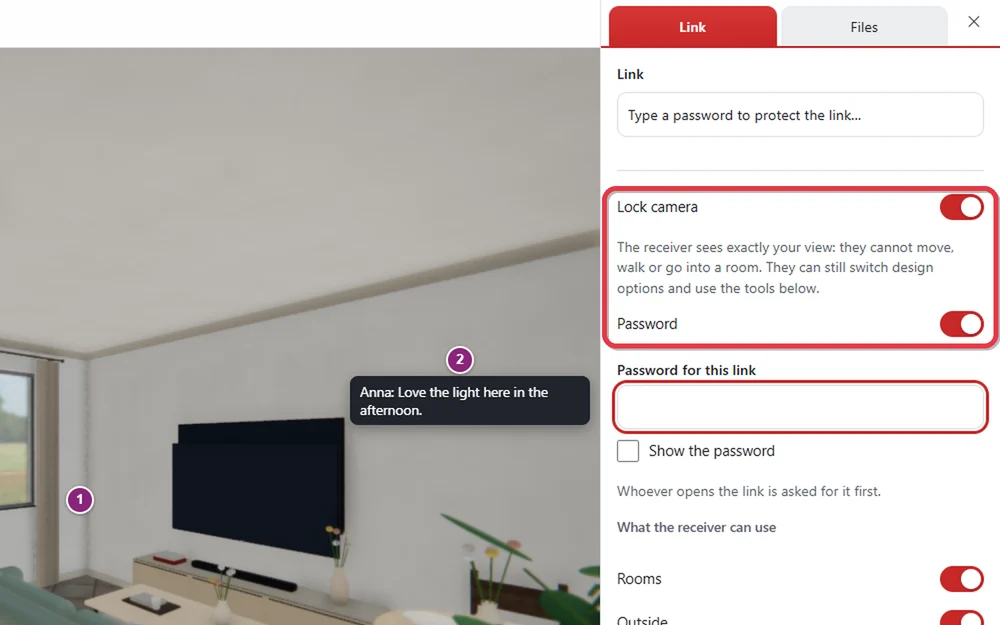
يحمل الرابط التصميم كله كما تراه: المشهد وإعدادات الشمس (المكان والتاريخ والساعة والشمال) والأثاث الذي حرّكته أو أضفته والتشطيبات والجدران والأبواب والنوافذ والأبواب المغلقة وأسماء الغرف وخيارات العرض. فعّل تضمين خيارات التصميم لترسل خيارات التصميم كلها أيضًا. خاماتك التي رفعتها لا ترافق الرابط؛ يرى المتلقي التشطيب الأصلي للغرفة بدلًا منها. إذا غيّرت المشهد بعد إنشاء الرابط، تنشئ تحديث الرابط ليطابق هذا العرض رابطًا جديدًا.
- قفل الكاميرا: يرى المتلقي مشهدك نفسه ولا يستطيع التجوّل أو الانتقال إلى غرفة أخرى. يبقى بإمكانه التبديل بين خيارات التصميم واستخدام الأدوات التي تركتها مفعّلة.
- كلمة المرور: تُطلب أولًا ممن يفتح الرابط. وتُطلب لعرض تعليقات التصميم أيضًا.
- ما يستطيع المتلقي استخدامه: عطّل أدوات مثل تعديل أو التعليقات ليقتصر الرابط على المشاهدة. تعمل الأدوات التي تُبقيها مفعّلة ما دام لديك اشتراك؛ ومن دونه يكون كل رابط للعرض فقط: يستطيع الناس التجوّل والنظر وقراءة التعليقات، وتظهر الأدوات التي تغيّر أو تصيّر أو تحفظ لكنها مغلقة.
A link to a plan you uploaded works for 30 days, then it expires. Sample designs stay available. A plan read free has no links for other people.
تضمين في موقع ويب
يعطيك تضمين في موقع ويب أسفل علامة الرابط رمز iframe جاهزًا. الصقه في صفحتك أو إعلانك ليظهر التجوّل داخلها. تُخفى اللوحات الإضافية في العرض المضمّن لإفساح المجال للمنزل.
لتخطّي المقدمة في التضمين، أضف &start=walk أو &start=overview إلى العنوان داخل الشيفرة.
Pictures and the Render button
Photos, pictures in a chosen size and AI pictures are made with the Render button in the top bar. How to choose a size and a style, what AI render costs and where the finished pictures go is on Graphics modes and Photo.
Downloads: the Files tab
Open Share, then the Files tab. Under Download it lists:
- Picture of this view: what you see now, as a high-resolution PNG. It opens in a new tab; if the browser blocks the new tab, the picture is downloaded instead.
- Floor plan: a 2D drawing as an SVG, for editing and printing, or a PNG, for sharing. Tick what it shows: Furniture, Room names and areas, Room dimensions and Furniture sizes (width × depth; they need the furniture). Your choices are remembered in your browser.
- 3D model: the whole home, with its walls, floors and every piece of furniture, as GLB for Blender and most 3D apps, USDZ for AR on iPhone and iPad, or OBJ for SketchUp and CAD (shapes only). Each piece of furniture is a separate piece named after its type, so you can pick it up and move it in a 3D program. Untick With textures for plain colours and a much smaller file; OBJ never has textures.
- Intro video: Record plays the intro and records it as MP4 or WebM, about 9 seconds. Chrome, Edge and Safari can record it; where the browser cannot, this block is hidden.
- Plan data: the recognised plan as JSON, for developers.
The files are created on your device while you wait, so large models can take a moment. The 3D files, the floor plan drawings and the plan data come with a subscription (Plus or Pro) and show a lock until then; the picture of this view and the intro video are open to everyone.
مشاهدة منزل بالواقع المعزّز على iPhone أو iPad
- Open Share on your iPhone or iPad, choose the Files tab and save the USDZ file under 3D model.
- افتحه من تطبيق «الملفات» أو من الرسالة التي حفظته فيها. سيفتحه عارض الواقع المعزّز الخاص بـ Apple.
- اتبع التلميحات على الشاشة لوضع النموذج على طاولة أو على الأرض.
ما المجاني
The picture of this view, the intro video and photos made with Local render are free, on the sample designs and on your own plan; an AI render costs 7 credits a picture (see Graphics modes and Photo). The plan's files (the 3D files, the floor plan drawings and the plan data) come with a subscription (Plus or Pro), unless you bought a credit pack before subscriptions started; see Your own plan. One file is free for a plan that was read free and then closed: its data, with all your changes, as a JSON file from the lock screen, for the 30 days the plan is kept.
شاهده بتقنية ثلاثية الأبعاد
افتح تصميمًا نموذجيًا وتجوّل فيه، وتحقّق من الشمس، واضبط الساعة وشاهد المصابيح تضيء. الأمر مجاني، في متصفحك، ولا حاجة إلى تثبيت أي شيء.
أو افتح أحد النماذج مباشرة: كوخ معلّم من عشرينيات القرن العشرين (1920–1929) · شقة بغرفتي نوم