知识库
分享、嵌入与下载
发送链接,把 3D 漫游嵌入你的网站,并导出图片、户型图、3D 模型、视频和户型数据。
At the top right, Share holds the link, its settings, the embed code and the downloads. The Render button in the top bar makes the pictures.
分享链接
分享有链接和文件两个标签。打开链接时,当前设计的短链接已准备好:选择复制复制链接;如果浏览器支持,也可以选分享…,使用手机的系统分享菜单。
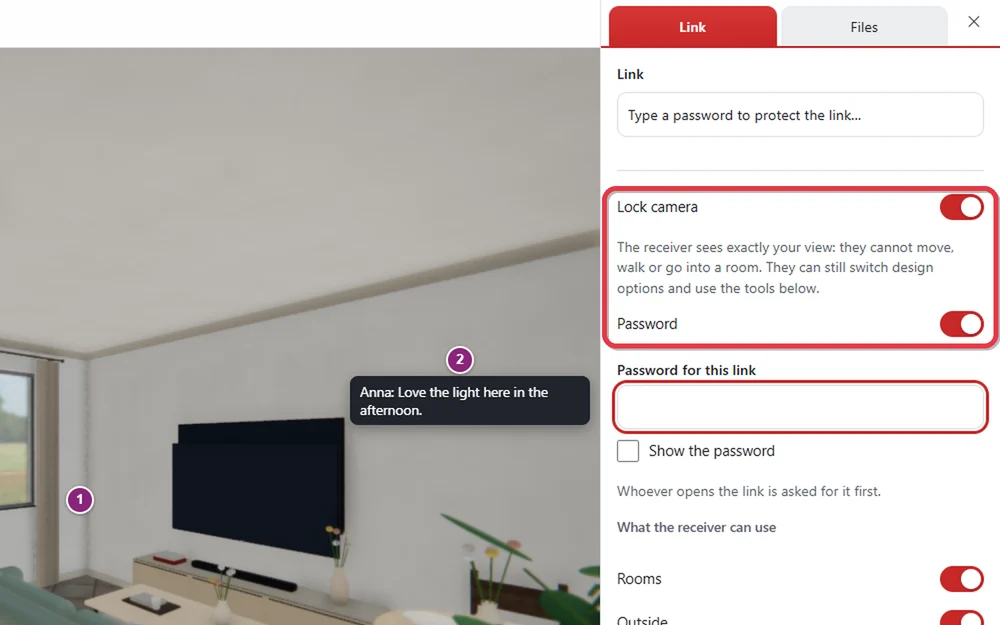
链接会带上你当前看到的完整设计:视角、太阳设置(地点、日期、时间和正北方向)、移动或添加的家具、饰面、墙体、门窗、关闭的门、房间名称和视图选项。勾选包含设计方案,还可一并发送所有设计方案。你上传的材质不会随链接发送,接收者会看到房间原来的饰面。如果创建链接后更改了视角,选择按当前视图更新链接可生成新链接。
- 锁定相机:接收者看到的视角与你完全相同,无法漫游或进入其他房间。仍可切换设计方案,并使用你开放的工具。
- 密码:打开链接的人需要先输入密码。查看该设计的评论也需要密码。
- 接收者可以使用的功能:关闭编辑或评论等工具,让链接只供查看。你保持开启的工具在你有订阅期间有效;没有订阅时,每条链接都仅供查看:人们可以漫游、查看和阅读评论,而会更改、渲染或保存的工具会显示出来但处于关闭状态。
A link to a plan you uploaded works for 30 days, then it expires. Sample designs stay available. A plan read free has no links for other people.
嵌入网站
嵌入网站位于链接标签底部,提供现成的 iframe 代码。将它粘贴到网页或房源介绍中,住宅漫游视图就会嵌入其中。嵌入视图会隐藏额外面板,为住宅画面留出更多空间。
如果想在嵌入中跳过片头,请在代码内的地址后加上 &start=walk 或 &start=overview。
Pictures and the Render button
Photos, pictures in a chosen size and AI pictures are made with the Render button in the top bar. How to choose a size and a style, what AI render costs and where the finished pictures go is on Graphics modes and Photo.
Downloads: the Files tab
Open Share, then the Files tab. Under Download it lists:
- Picture of this view: what you see now, as a high-resolution PNG. It opens in a new tab; if the browser blocks the new tab, the picture is downloaded instead.
- Floor plan: a 2D drawing as an SVG, for editing and printing, or a PNG, for sharing. Tick what it shows: Furniture, Room names and areas, Room dimensions and Furniture sizes (width × depth; they need the furniture). Your choices are remembered in your browser.
- 3D model: the whole home, with its walls, floors and every piece of furniture, as GLB for Blender and most 3D apps, USDZ for AR on iPhone and iPad, or OBJ for SketchUp and CAD (shapes only). Each piece of furniture is a separate piece named after its type, so you can pick it up and move it in a 3D program. Untick With textures for plain colours and a much smaller file; OBJ never has textures.
- Intro video: Record plays the intro and records it as MP4 or WebM, about 9 seconds. Chrome, Edge and Safari can record it; where the browser cannot, this block is hidden.
- Plan data: the recognised plan as JSON, for developers.
The files are created on your device while you wait, so large models can take a moment. The 3D files, the floor plan drawings and the plan data come with a subscription (Plus or Pro) and show a lock until then; the picture of this view and the intro video are open to everyone.
在 iPhone 或 iPad 上用 AR 查看房子
- Open Share on your iPhone or iPad, choose the Files tab and save the USDZ file under 3D model.
- 从“文件”应用或你保存它的那条消息中打开它。苹果自带的 AR 查看器会将其打开。
- 按屏幕上的提示,把模型放到桌面或地面上。
哪些是免费的
The picture of this view, the intro video and photos made with Local render are free, on the sample designs and on your own plan; an AI render costs 7 credits a picture (see Graphics modes and Photo). The plan's files (the 3D files, the floor plan drawings and the plan data) come with a subscription (Plus or Pro), unless you bought a credit pack before subscriptions started; see Your own plan. One file is free for a plan that was read free and then closed: its data, with all your changes, as a JSON file from the lock screen, for the 30 days the plan is kept.
在 3D 中亲眼看看
打开一个示例户型,走进去看看,查看阳光,设好时刻,看着灯一盏盏亮起来。完全免费,在浏览器中即可使用,无需安装任何东西。
或直接打开一个示例: 1920 年代的教师小屋 · 两居室公寓