知识库
画质模式与照片
“简单”和“写实”画质有什么区别,如何在“导出”中制作照片,以及哪些设备可以使用。
简单与写实
画质在左侧工具栏的相机工具中选择,有两种模式:
- 简单速度最快。它能让较旧的笔记本电脑保持流畅行走,也是手机和平板上唯一的模式。
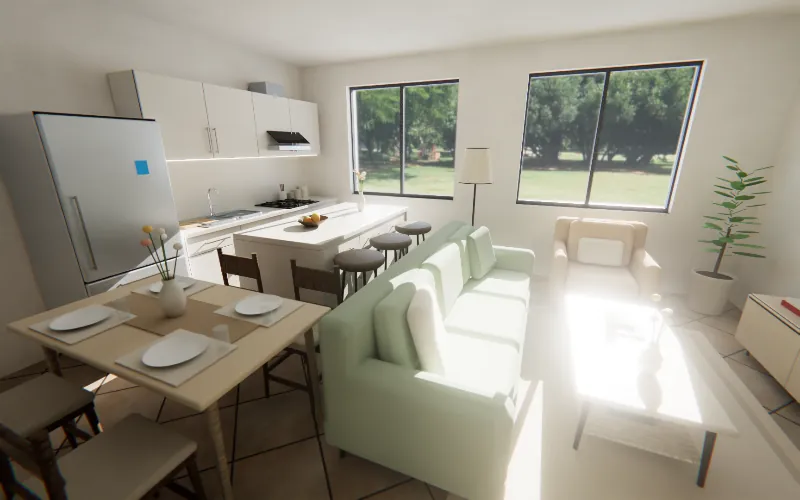
- 写实会加入自然光、反射,并在你停下脚步时呈现照片级画质。它是为电脑准备的。相机效果(辉光、颗粒等)只在这种模式下可用;见相机与灯光。
每次访问都从“简单”开始。你的选择不会被保留:刷新页面后,画质又变回“简单”。在手机和平板上画质始终是“简单”,也不会显示这个选项。如果“写实”在你的电脑上很可能会卡(处理器核心少、内存小,或浏览器不支持 WebGPU),或者行走变得卡顿,屏幕上会出现一条提示栏,提供切换为“简单”。查看器从不会自己切换;由你决定,你也可以随时切换回来。
Photos and the Render button
The Render button in the top bar turns the view you are looking at into a picture. Two kinds of picture are made:
- Local render is a photo-quality picture of exactly what you see, made on your computer. It is traced pass by pass, up to 192 passes, following how light travels through the room, and a denoiser then smooths out the grain, so shadows and reflections look natural. It is free.
- AI render turns the 3D picture of your view into a photograph. It costs 7 credits a picture (the button shows the price) and needs you to be signed in. It works on any device, phones included, because the AI draws it from a screenshot of the view. It is made at about 2K and scaled to the size you pick.
- Walk to where you want a picture. Set the hour in the Sun tool and the lamps first if you like.
- Press the round red camera button, Photo, at the bottom right of the picture. The view joins the photo queue, and a small counter appears on Render. Add as many views as you like, up to 12; the same view in the same light is added only once.
- Open Render. Choose a Size: As is (the shape of your window), Horizontal (1920 × 1080), Vertical (1080 × 1920) or Square (1080 × 1080). The view takes that frame, with dark margins around it, and the file has exactly that size. Then choose the picture style: AI render, Local render or Sketch (coming soon). Choose Render the queue, or Render this view for just the view on screen.
- For AI render you can also write Your wishes (up to 400 characters, for example "warm evening light, oak floor") and add one Reference picture: a picture of a look you like, with its materials, colours and mood.
- The pictures are made one after another in this window, so keep it open and in front. A traced Local render takes about a minute each; an AI render is quicker. Each thumbnail shows its own progress, and the Photo button shows the progress of the whole run; press it to stop. If the graphics are Simple, a Local render switches them to Realistic for you when your browser supports WebGPU. If an AI render fails, nothing is charged, and the failed view stays in the queue with the reason.
- Finished pictures go to the gallery: Open gallery in the Render panel. Click a picture to see it large; use the arrows, a swipe or the left and right keys to move between them, and Esc or a click outside to close. Each one has its own download button, and Download all as ZIP saves them in one file. Pictures are kept in this browser, and in your account when you are signed in; the oldest are removed when there are too many, so download the ones you want to keep.
Tick Film grain, Chromatic aberration or Depth of field in the same panel to add them to a Local render; they are available in Realistic graphics and are not applied to an AI render. While pictures are being made, any action that would cancel one asks you to confirm first.
For a quick picture of exactly what you see now, use Picture of this view in the Files tab of Share: it opens a high-resolution picture in a new tab, or downloads it if the browser blocks the tab.
A traced Local render needs a computer whose browser supports WebGPU, such as Chrome or Edge. On phones, tablets and browsers without it, a Local render takes each picture as the view looks, without the long render, and the button reads Make pictures; AI render works there too. Simple and Realistic still work normally.
我该用哪种模式?
- 在手机或平板上漫游户型:简单,那里始终使用它。
- 在较旧的电脑上漫游:简单。
- 在性能够用的电脑上评估光线和氛围:写实。
- A picture for a listing, a message or a moodboard: Picture of this view for a quick one, or add views to the photo queue and use Render for the best quality.
如果出现问题,请见故障排除。
在 3D 中亲眼看看
打开一个示例户型,走进去看看,查看阳光,设好时刻,看着灯一盏盏亮起来。完全免费,在浏览器中即可使用,无需安装任何东西。
或直接打开一个示例: 1920 年代的教师小屋 · 两居室公寓