知识库
快速上手
打开一个示例户型,在其中漫游并试用各项工具。大约两分钟,无需安装任何东西,账号也是可选的,打开浏览器就能开始。
Home 3D Studio 能把 2D 户型图变成可以在浏览器中走进去的 3D 家。想知道是什么感觉,最快的办法就是打开一个示例户型。
打开示例户型
- 前往免费试用,选择一个示例,或直接打开:1920 年代的教师小屋或两居室公寓。
- 观看简短的片头:图纸逐渐变成一座房子。你可以点跳过片头或按 Esc 键跳过。
- 环顾四周:用鼠标或手指拖动。在手机或平板上,点按地面即可走过去;在电脑上,使用 W A S D 或方向键。
- 用顶部的漫游和俯瞰来改变你的移动方式。
You need a recent browser (Chrome, Safari, Edge or Firefox) on a phone, tablet or computer. There is nothing to install, and an account is optional: sign in only to keep your designs on every device. Reading your own plan costs credits; the first reading is free and needs no card. To keep a plan, confirm an e-mail address or sign in.
工具栏
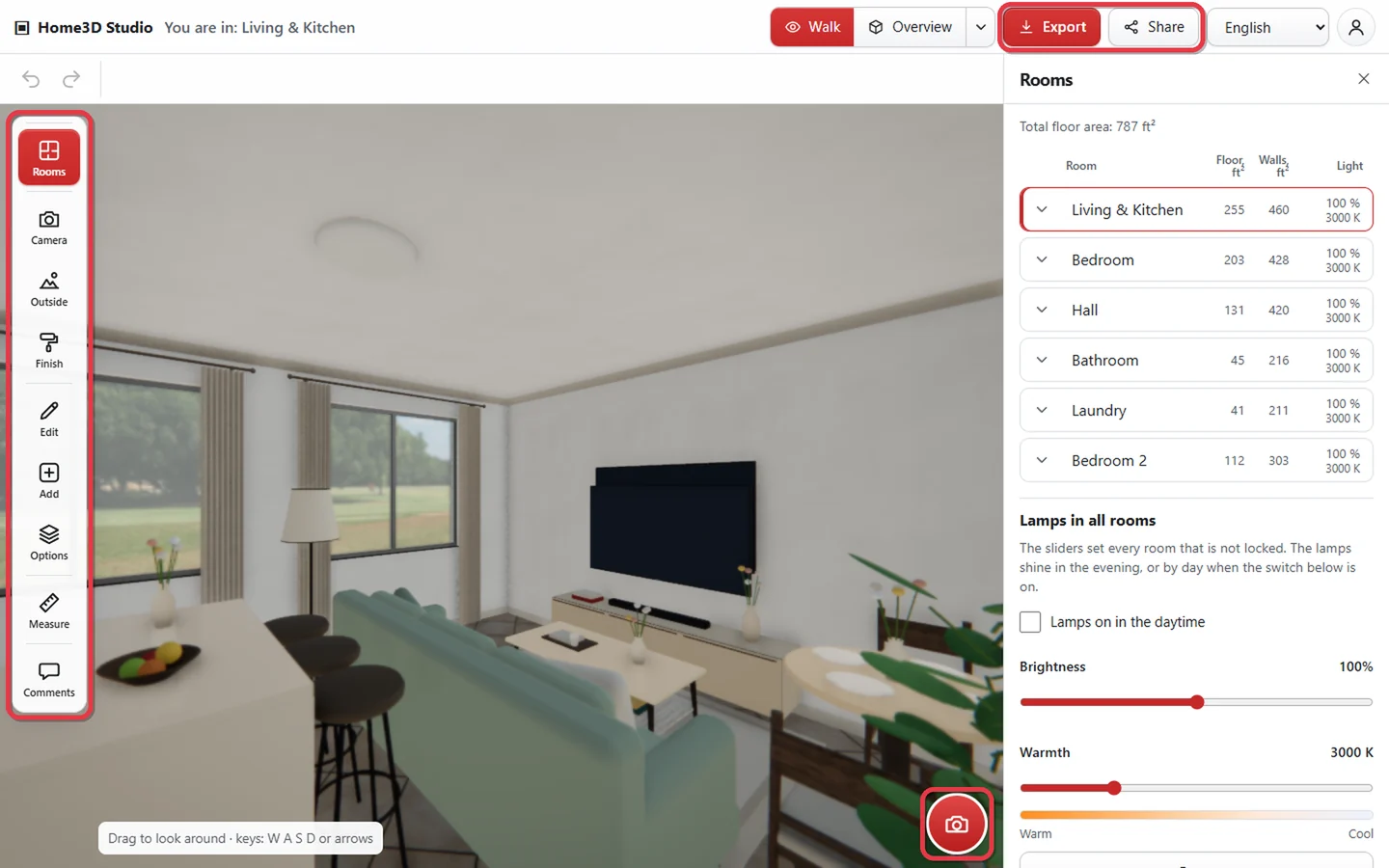
The toolbar on the left holds the tools, each with its name: Rooms, Camera, Outside, Finish, Edit, Add, Options, Measure and Comments. Choose one and its panel opens. The lamps are set in Rooms. On a computer, Undo and Redo stand at the start of the bar above the picture, followed by the main buttons of the open tool; on a phone they are at the top of the toolbar. Render and Share are the buttons at the top, and the round red camera button, Photo, at the bottom right adds the view to your photos. Outside has three tabs: Surroundings, Sun and North.
试用各项工具
示例户型免费提供全部工具:
- 漫游和环顾。详见漫游与操作。
- 俯瞰和房间。从上方查看剖开的住宅和房间列表,详见俯瞰与房间。
- 太阳。在窗外工具中打开太阳标签。选择城市、日期和时间,查看阳光照射的位置:太阳工具。
- 一天中的光线。黄昏、夜晚和灯光随时间变化:一天中的光线。
- 相机和灯具。图形、镜头、曝光、效果和灯具:相机与灯具。
- 编辑和添加。移动家具并添加新物品:编辑和添加家具。
- 墙体、门和窗。在俯瞰模式中,编辑墙体可打开户型平面图:编辑墙体、门和窗。
- 饰面。地板、墙漆、壁纸、踢脚线和顶角线:饰面、踢脚线和顶角线。
- 方案。保留并切换多个设计:设计方案。
- 测量和评论。测量墙体或地板,并为收到分享链接的人添加评论。
- 图形和照片。图形模式与照片。
- Render and Share. Share, embed and downloads and Graphics modes and Photo.
你自己的户型图
要将自己的户型图变成可漫游的 3D 住宅,请在上传户型图页面上传图片。每张户型图需要 20 积分;积分按包销售,50 积分的充值包价格为 €4.99,如果无法识别,积分会退还。详情见上传你自己的户型图;哪些户型图可用说明如何准备图片。 Your first plan can be read free, with no credits (conditions on that page).
在 3D 中亲眼看看
打开一个示例户型,走进去看看,查看阳光,设好时刻,看着灯一盏盏亮起来。完全免费,在浏览器中即可使用,无需安装任何东西。
或直接打开一个示例: 1920 年代的教师小屋 · 两居室公寓