ナレッジベース
はじめに
サンプルデザインを開いて歩き回り、ツールを試してみましょう。約2分で、インストールは必要ありません。
Home 3D Studioは、2Dの間取り図を、ブラウザで歩いて回れる3Dの住まいに変えます。その感覚をいちばん手軽に確かめるには、サンプルデザインを開いてみてください。
サンプルデザインを開く
- 無料で試すに進んでサンプルを選ぶか、直接開きます。1920年代の教員住宅と2ベッドルームのアパートメントがあります。
- 図面が家に変わる短いイントロをご覧ください。イントロをスキップかEscapeキーで飛ばせます。
- マウスまたは指でドラッグして見回します。スマートフォンやタブレットでは行きたい場所の床をタップして歩きます。パソコンではW A S Dまたは矢印キーを使います。
- 上部の歩くと俯瞰で、動き方を切り替えます。
You need a recent browser (Chrome, Safari, Edge or Firefox) on a phone, tablet or computer. There is nothing to install, and an account is optional: sign in only to keep your designs on every device. Reading your own plan costs credits; the first reading is free and needs no card. To keep a plan, confirm an e-mail address or sign in.
ツールバー
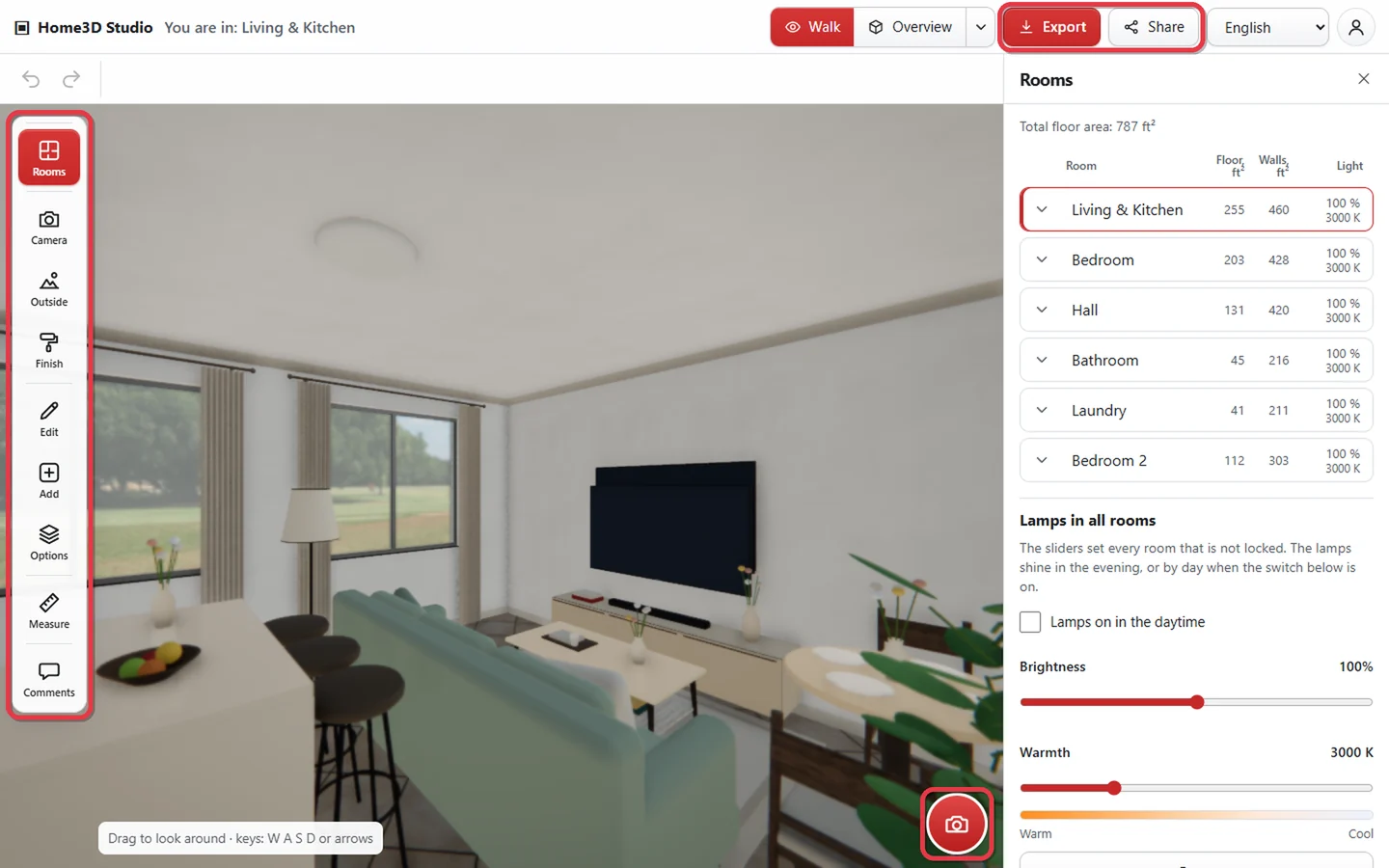
The toolbar on the left holds the tools, each with its name: Rooms, Camera, Outside, Finish, Edit, Add, Options, Measure and Comments. Choose one and its panel opens. The lamps are set in Rooms. On a computer, Undo and Redo stand at the start of the bar above the picture, followed by the main buttons of the open tool; on a phone they are at the top of the toolbar. Render and Share are the buttons at the top, and the round red camera button, Photo, at the bottom right adds the view to your photos. Outside has three tabs: Surroundings, Sun and North.
ツールを試す
サンプルでは、すべてのツールを無料で使えます。
- 歩いて見回す: 歩き方と操作をご覧ください。
- 俯瞰と部屋: 上から見た断面ビューと、部屋のリストです。俯瞰と部屋をご覧ください。
- 太陽: 窓の外ツールで太陽タブを開きます。都市、日付、時刻を選ぶと、日が当たる場所を確認できます。太陽ツールをご覧ください。
- 一日の光: 夕暮れ、夜、ランプは時刻に合わせて変わります。一日の光をご覧ください。
- カメラと照明: グラフィックス、レンズ、露出、エフェクト、ランプの設定です。カメラと照明をご覧ください。
- 編集と追加: 家具を動かしたり、新しいパーツを追加したりします。家具の編集と追加をご覧ください。
- 壁、ドア、窓: 俯瞰で壁を編集を選ぶと、間取りの図面が開きます。壁、ドア、窓の編集をご覧ください。
- 仕上げ: 床、塗装、壁紙、巾木、廻り縁を変えます。仕上げ、巾木、廻り縁をご覧ください。
- オプション: 複数のデザインを保存して切り替えます。デザインオプションをご覧ください。
- 計測とコメント: 壁や床を計測したり、共有する相手に向けてコメントをピンで留めたりできます。
- グラフィックスと写真: グラフィックスモードと写真をご覧ください。
- Render and Share. Share, embed and downloads and Graphics modes and Photo.
ご自身の間取り図
ご自身の間取り図を歩いて回れる3Dの住まいにするには、間取り図をアップロードから画像を送ってください。1件につき20クレジットが必要です。クレジットはパックで販売され、50クレジットのパックは€4.99から購入できます。間取り図を読み取れなかった場合、クレジットは戻ります。詳しくはご自身の間取り図を、画像の準備については使える間取り図をご覧ください。 Your first plan can be read free, with no credits (conditions on that page).
3Dで見てみましょう
サンプルデザインを開いて歩き回り、太陽の位置を確かめ、時刻を合わせてランプが灯るのを見てみましょう。無料で、ブラウザだけで使えます。インストールは不要です。
サンプルを直接開く: 1920年代の教員住宅 · 2ベッドルームのアパートメント