ナレッジベース
共有・埋め込み・ダウンロード
リンクを送る、ウォークスルーをウェブサイトに埋め込む、画像・間取り図・3Dモデル・動画・間取りデータを書き出す方法です。
At the top right, Share holds the link, its settings, the embed code and the downloads. The Render button in the top bar makes the pictures.
リンクを共有する
共有には、リンクとファイルの2つのタブがあります。リンクタブには、今見ているデザインの短いアドレスがあらかじめ用意されています。コピーを選ぶとコピーでき、ブラウザが対応していれば共有…でスマートフォンの共有シートを使えます。
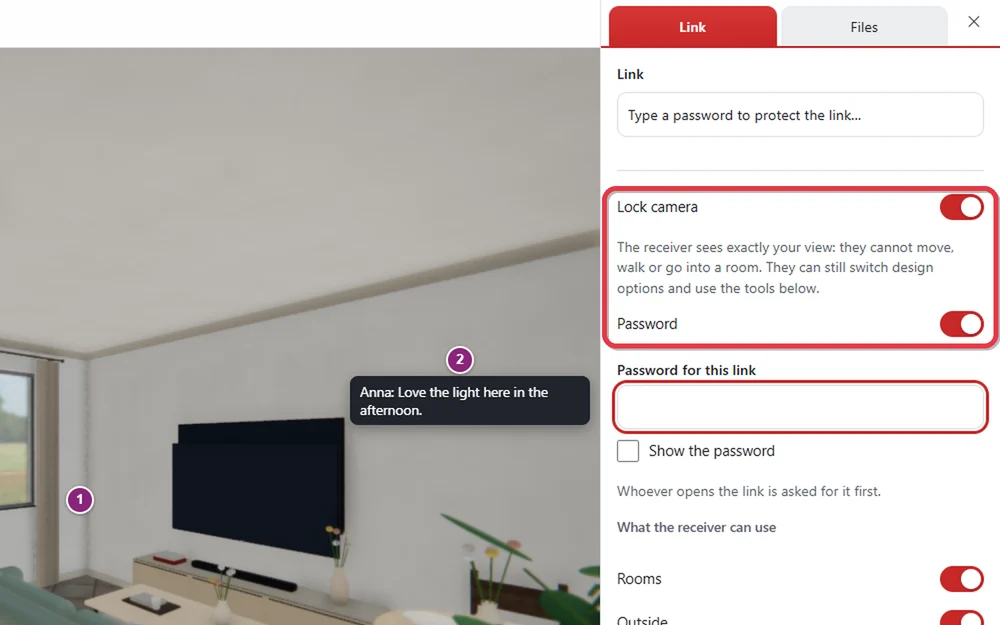
リンクには、見ているとおりのデザイン全体が含まれます。視点、太陽の設定(場所、日付、時刻、北)、動かしたり追加したりした家具、仕上げ、壁、ドア、窓、閉めたドア、部屋名、ビューの設定です。デザインのオプションを含めるにチェックを入れると、すべてのデザインオプションも一緒に送れます。ご自身でアップロードしたテクスチャは含まれず、受け取った人にはその部分に部屋の元の仕上げが表示されます。リンクを作ったあとで視点を変えた場合は、このリンクを現在の表示に更新で新しいリンクを作れます。
- カメラを固定:受け取った人にはあなたの視点がそのまま表示され、歩いたり別の部屋に入ったりはできません。デザインオプションの切り替えと、オンのままにしたツールは使えます。
- パスワード:リンクを開く人には、最初にパスワードの入力を求めます。デザインへのコメントでも入力が必要になります。
- 受け取った人が使えるもの: 編集やコメントなどのツールをオフにすると、見るだけのリンクにできます。オンのままにしたツールは、サブスクリプションをご利用の間に使えます。ご利用でない場合、すべてのリンクは閲覧専用です。歩いて見て回ることとコメントを読むことはできますが、変更、レンダリング、保存を行うツールは表示されるだけで使えません。
A link to a plan you uploaded works for 30 days, then it expires. Sample designs stay available. A plan read free has no links for other people.
ウェブサイトに埋め込む
リンクタブの下部にあるウェブサイトに埋め込むで、そのまま使えるiframeコードが表示されます。ページや物件情報に貼り付けると、その場でウォークスルーが表示されます。埋め込み表示では、住まいを広く見せるため、追加のパネルは隠れます。
埋め込みでイントロを飛ばすには、コード内のアドレスに &start=walk または &start=overview を追加します。
Pictures and the Render button
Photos, pictures in a chosen size and AI pictures are made with the Render button in the top bar. How to choose a size and a style, what AI render costs and where the finished pictures go is on Graphics modes and Photo.
Downloads: the Files tab
Open Share, then the Files tab. Under Download it lists:
- Picture of this view: what you see now, as a high-resolution PNG. It opens in a new tab; if the browser blocks the new tab, the picture is downloaded instead.
- Floor plan: a 2D drawing as an SVG, for editing and printing, or a PNG, for sharing. Tick what it shows: Furniture, Room names and areas, Room dimensions and Furniture sizes (width × depth; they need the furniture). Your choices are remembered in your browser.
- 3D model: the whole home, with its walls, floors and every piece of furniture, as GLB for Blender and most 3D apps, USDZ for AR on iPhone and iPad, or OBJ for SketchUp and CAD (shapes only). Each piece of furniture is a separate piece named after its type, so you can pick it up and move it in a 3D program. Untick With textures for plain colours and a much smaller file; OBJ never has textures.
- Intro video: Record plays the intro and records it as MP4 or WebM, about 9 seconds. Chrome, Edge and Safari can record it; where the browser cannot, this block is hidden.
- Plan data: the recognised plan as JSON, for developers.
The files are created on your device while you wait, so large models can take a moment. The 3D files, the floor plan drawings and the plan data come with a subscription (Plus or Pro) and show a lock until then; the picture of this view and the intro video are open to everyone.
iPhoneやiPadでARで住まいを見る
- Open Share on your iPhone or iPad, choose the Files tab and save the USDZ file under 3D model.
- 「ファイル」アプリか、保存したメッセージから開きます。Apple標準のARビューアが開きます。
- 画面のヒントに従って、テーブルや床にモデルを置きます。
無料の範囲
The picture of this view, the intro video and photos made with Local render are free, on the sample designs and on your own plan; an AI render costs 7 credits a picture (see Graphics modes and Photo). The plan's files (the 3D files, the floor plan drawings and the plan data) come with a subscription (Plus or Pro), unless you bought a credit pack before subscriptions started; see Your own plan. One file is free for a plan that was read free and then closed: its data, with all your changes, as a JSON file from the lock screen, for the 30 days the plan is kept.
3Dで見てみましょう
サンプルデザインを開いて歩き回り、太陽の位置を確かめ、時刻を合わせてランプが灯るのを見てみましょう。無料で、ブラウザだけで使えます。インストールは不要です。
サンプルを直接開く: 1920年代の教員住宅 · 2ベッドルームのアパートメント